Showing posts with label computers. Show all posts

Sunday, November 6, 2011

Database Project

ISM3004 Database Project

"Microsoft sign outside building 99" by Robert Scobie
http://www.flickr.com/photos/scobleizer/2264763977/
Creative Commons License: http://creativecommons.org/licenses/by/2.0/deed.en

Upon completing the database project, I was able to successfully create queries, reports and forms for a database full of members. I learned and implemented how to create new tables and set a primary key. I also learned how to add new members to the table, form or report. I am now comfortable with using queries to return only certain information and certain fields. I am able to sort by specific groups and how to sort by specific fields and to have them not show in the Form. Your report not fitting onto your page correctly? No problem! I've learned to adjust a report and adjust it to use landscape orientation, so that it will fit on a single page easily! Databases are a great way to keep a business organized and to quickly look up specific information if needed!

If I was to improve the functionality of this database I would create validation text for whenever someone tries to change the MemberID field. It is read only but the project doesn't require it to display a validation text that prohibits the user from trying to enter a value. The only other thing that I would do was create a custom form of the data instead of a simple form that we have created in the database. I believe that I could have possibly made something better looking and more user friendly if I was to create the form by myself with the other options in Access.

Thursday, November 3, 2011

Week 11: Clear on Danger in Data Breach

Is Your Private Information Safe? 

"Padlock " by Declan Jewell
http://www.flickr.com/photos/declanjewell/2472470758/
Creative Commons License: http://creativecommons.org/licenses/by/2.0/deed.en

Entering your information in a website could potentially be dangerous in the long run. The databases that hold your information could be compromised. If that happens, millions of people's information will be released, possibly to the public. Once a companies data is breached, they could have long term access without the company knowing. 

Many companies have been shunned in the past for their insecure databases which have ultimately led to millions of people's credentials to be released to hackers.  A firm example of this is the Playstation Network's massive data breach. A hacker that manipulated the system's security was able to extract millions of user's account information.

 This includes, but is not limited to:
  • Their Name
  • Their Address
  • Their E-Mail Address
  • Their Password that they may have used on other secure websites
  • Their Credit Card Information
This will lead the company to run into lawsuits and a large reduction of sales. Who would want to buy from a company that just went through a terrible incident like that? I wouldn't trust a company that allowed a hacker to take millions of people's credit card information! The people who's information was leaked could potentially file a lawsuit against Sony for having their personal information made public to malicious users such as hackers due to the company's poor security system. For years now, people will think twice before putting their information on the playstation network again. Also, the government may have to intervene in some instances and have Sony follow set rules. Doing that will cause the company to lose many sales because they aren't focusing on profiting, just on meeting requirements. 

This is extremely relative to the business work because you may enter your personal information on a website and it may be in the wrong hands without you knowing. You may invest your companies' dollars into a company that has been breached. This could cause potential losses in profit and you may have to find other places to invest in. You must be very careful with your money and what you do with it!

An article i found particularly interesting was:
http://searchsecurity.techtarget.com/definition/data-breach
This article explains what a data breach is in depth and really helps one understand the concepts. It was a great read!

Thanks for reading! See you next week!

Saturday, October 29, 2011

Week 10: Clear on Basic Database Functions and Tables

Basic Database Functions and Tables

"Microsoft Access 2010, What's New Screenshots " by IvanWalsh.com
http://www.flickr.com/photos/ivanwalsh/3939161199/
Creative Commons License: http://creativecommons.org/licenses/by/2.0/deed.en

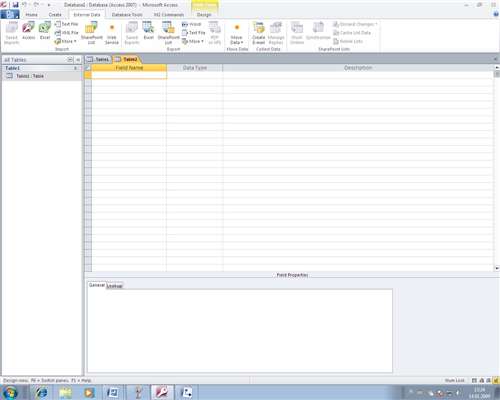
This week I was able to surround myself with databases and basic Microsoft Access functions. I am running a Windows computer and used Microsoft Office Access 2007 to go through the Scavenger Hunt Questions and learn how everything works.

First, I practiced the use of tables in a database. Creating a table is easy, all you need to do is go to the Create Ribbon Bar in Microsoft Access, then Click on table in the top left hand corner. From there you can add new fields to the table by simply clicking on New Field in the Datasheet Ribbon Bar. In design view, you can add a description of the field as well! 

A Primary Key is extremely important when starting a blank database.  This is a value that is unique for each record in the database, and you only have one of these specific keys.  A Primary key can easily be set by right clicking on the field you wish to make a primary key, and clicking "Primary Key". You can also click on this field and select Primary Key on the ribbon bar. 

Also, you can configure a field to only accept a certain value by configuring it's validation, which can be found by going into Design View, clicking on a field, then clicking on the Property Sheet on the ribbon bar. You can enter a validation rule and validation text for when the rule fails. Need to import excel or CSV data into a new table? No problem! Simply go to the External Data Tab, choose the file you'd like to import, navigate to your file, then follow the Import Spreadsheet Wizard!

These concepts are very important in business because implementing Microsoft Access and databases into a company can help them become more organized. Doing this will help keep records for a companies employees, or anything that they'd like to have on reference. It is simple to create a database and very easy to reap the rewards of one by creating queries and forms. Databases are a must for businesses!

A great resource I found while researching databases was found here:
http://www.articlesbase.com/databases-articles/microsoft-access-in-todays-business-693002.html
The author explains exactly why modern day businesses should incorporate databases into their daily routines! It is a great read! 


Thanks for visiting my blog! See you next week!

Thursday, October 20, 2011

Excel Project

ISM3004 Excel Project

"AvgIncrease" by Michael Balmaceda

        Upon completing the Excel Project for ISM3004, I learned countless techniques that will help me succeed in the business world. Not only have I sharpened my skills of Excel, but I've also learned the formulas necessary to consolidate a huge, one thousand subject document into an organized array of data.  I learned keyboard shortcuts such as Ctrl+Down that helped shave my time in completing the project.

        By practicing the fundamentals that I learned in lecture, I mastered Excel navigation such as adding new rows and columns, formatting cells, and adjusting print features on Excel.  I utilized the Pivot Table feature of excel as shown in the picture above. Through lecture I've learned how to create gorgeous pivot tables with ease. I was able to get the hang of these various techniques by completing this project. It was not a difficult project by any means, and I enjoyed the project more than anything.

        In the end, I was able to hone in on the core Excel skills that will help me be successful in the future. I needed to dust off my skills with Excel, and this project helped me do exactly that. The raw data given to me in the beginning is now a very presentable, organized array of data. From formatting cells to creating formulas, this Excel project provided me with enough practice to be confident with my usage in Excel. 

Tuesday, October 18, 2011

Week 9: Clear on Increase in Machine Intelligence

How Computers May Outsmart us 
by the End of the Century


"Machine vision" by Stuart Caie
http://www.flickr.com/photos/kyz/2912259398/lightbox/
Creative Commons License: http://creativecommons.org/licenses/by/2.0/deed.en


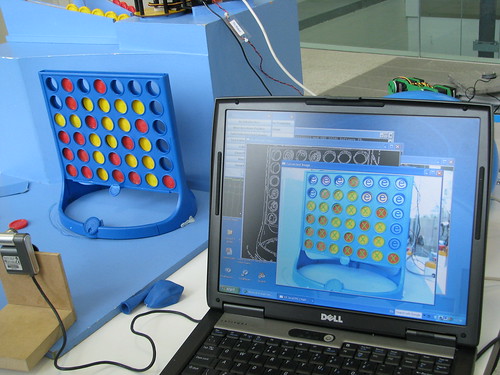
        After listening to the speech made by  Michio Kaku, I was extremely interested in what could potentially happen to us if machines were to continue advancing as they are today.  The picture above is just a brief example of what machines are doing today. The machine shown above is playing connect four against itself, and as you can see, it understands the concept quite well.

        Michio Kaku first stated that our machines today are only as smart as insects. This is not potentially dangerous at all. He then went on to say that soon enough they could be as smart as mice. After that, they would be as smart as cats as dogs.

        Then I was shocked. Michio Kaku then stated how by the end of the century, our machines may be as smart as monkeys.  If machines are as smart as monkeys, they can potentially conjure up their own plans, make their own strategies, and own decisions. They DO NOT need to listen to you if they choose not to. Monkeys have enough of a brain capacity to do things on their own.

        This may be potentially dangerous to us because if machines become murderous, we could be in deep trouble. If we continue to manufacture smarter and smarter machines, they may outsmart us eventually. There have been large groups of people that have even gotten together to specify when they believe machines will eventually become smarter than us!

This is important in business because a company may rely on machines for all of its work, and when machines become smarter, what if they choose not to work? What if they choose to rebel? Our technology industry could be shattered if someone similar to this happens. We are much better off with keeping our machines' intelligence far from our level.


A great resource I enjoyed reading while looking up this topic was found here:


The author describes how machines are getting smarter, and could become potentially dangerous. Check it out!

Saturday, October 8, 2011

Week 7: Clear on Open Source

Open Source Software

"nom nom nom" by Matt McGee
http://www.flickr.com/photos/pleeker/3006047398/
Creative Commons License: http://creativecommons.org/licenses/by/2.0/deed.en


What is Open Source Software?
Open source software is always freely distributed software that contains the source code of the program. When developers include the source code with their software, they are giving you the opportunity to find errors in the software, or develop your own version of the software and make changes to the existing software.


What can you do with Open Source software?
You can do the following things with open source software:
  • You can develop your own version of the software
  • You can create new features to the software
  • You can fix errors in the software (and make money doing it)
  • You can distribute your own version of the software

    So what are the downsides to using Open Source Software?
    As seen in the picture above, with having a dog comes other responsibilities. The dog must be fed, walked, and tended to daily. Much like a dog, open source software that you develop may have problems, or you may need to hire other individuals to change the existing code for your company. Once these changes are made, you can sell the software.  Why is this important in business, you ask? Your company may be just starting up and may need to decide whether they would like to pay for their software, or use open source software as an alternative. This may be very cost-effective, and can bring the company off the ground if they develop their own strains of the open source software.

    What are some examples of Open Source Software available today?
    Some of the most popular examples of open source software include (but are not limited to):
    • Mozilla Firefox
    • Filezilla
    • RealVNC
    • WGet
    • Audacity
    • Gimp
    • OpenOffice
    • Linux
    • Apache
    And many, many more!

      A great source that I've found while researching Open Source software can be found here:
      http://www.howstuffworks.com/question435.htm

      This website will help answer anything you are unsure about with Open Source software!

      Thanks for reading! See you next week!

      Thursday, September 29, 2011

      Week 6: Clear on System Software vs Application Software

      System Software vs Application Software

      "Tug of War" by Josh James
      http://www.flickr.com/photos/joshwept/5689555989/
      Creative Commons License: http://creativecommons.org/licenses/by/2.0/deed.en


      What is the difference between System Software and Application Software?
      • System Software is a collection of programs that are required for your computer and its devices to function smoothly
      • Application software is any program that helps you complete a task.
      What are some examples of System Software and Application Software?
      System software is anything that helps keep your computer running smoothly. So, Windows 7 Operating System would be an example of system software.
      Still confused? McAfee AntiVirus, or Norton Anti-Virus are solid examples of System Software because they help keep your computer running smoothly.

      Application software, on the other hand, is anything that helps you complete a task. Examples of application software are Microsoft Word, Microsoft Powerpoint, or even Adobe Photoshop. 
      Other fine examples include MSN Messenger, or Notepad, because MSN helps you communicate with people, and Notepad helps you jot down notes. If those were the tasks you had in mind to complete, those programs can definitely lend a helping hand.

      Why is this important to business people like you?
      It is important that you know the difference between the two different types of software, and why they are developed. Some people are clueless as to what Microsoft Office is unless they've used it before. Knowing the difference between the two types of software is essential especially if you are a software developer or if you are running a business.

      A link that I found extremely helpful when looking up System Software and Application Software is found here: http://www.blurtit.com/q4080402.html
      This will answer any common misconceptions about the two types of software!

      Thanks for reading! See you next week!

      Tuesday, September 13, 2011

      Week 4: Clear on Competiton and Competitive Advantage in Business

      Competitive Advantage & Competition in Business


      "PC vs Mac" by Sergio de Candelario Delgado
      http://www.flickr.com/photos/hades87/2688943823/
      Creative Commons License: http://creativecommons.org/licenses/by-sa/2.0/

      This week I was particularly clear on the concept of competitive advantage in business. 

      First off, competitive advantage is both good and bad to the industry and it's consumers. When the iPhone first came out, everyone had to have one. Now, phones with an Android operating system have similar capabilities that the iPhone has, almost as if they copied the phone exactly and tweaked a few things.

      Competition in Business is GOOD for the industry because:
      • It leaves room for improvements in the products in the industry
      • Will lead to stronger products with more features
      • Will drive innovation so that companies will want to be the head of the industry with the leading product


      Competition in Business is BAD for the industry because:
      • Companies have to worry about doing any task better than their rivals
      • Companies can't do the same thing as each other. They have to be unique
      • Companies can copycat products and tweak them to be their own.
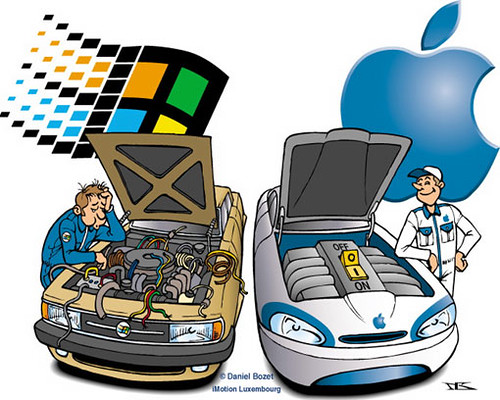
      • Will lead to bad blood between companies (Mac vs P.C.)

      Any product you create needs to be: Valuable, Rare, Imperfectly imitable, & Nonsubstitutable if you wish to come out on top of the industry without any companies stealing your ideas or your product structure. 

      In the end, competitive advantage and competition is vital in business because companies live off of copycatting products and making them better. Many "iPhone clones" have helped keep businesses alive because people believe that the product is the iPhone, except better. Without competition, each company would only have very few products, and wouldn't make the revenue they do today.

      A link that I found particularly interesting when researching competition and competitive advantage was the following:
      http://www.yeartosuccess.com/members/y2s/blog/VIEW/00000008/00000062/Competition-is-Good.html

      The link above describes three rules that will help your company benefit from your competition and come out on top.


      I hope you enjoyed my blog post for the week! I'll catch you next week! :)

      Tuesday, August 30, 2011

      Week 1: Clear on Netiquette

       "Play Nice" by Nosha.
      http://www.flickr.com/photos/nosha/3353134665/
      Creative Commons License: http://creativecommons.org/licenses/by-sa/2.0/deed.en

            This week I was very clear on the concept of netiquette. As i've been a member of online forums for many years, I understand netiquette very well. Netiquette, or net etiquette, is a broad term which describes the do's and dont's of online behavior. If you thought behaving in person was enough, you're about to stumble into a whole new world where you'll need to "play nice".      
                       

       With a little help, behaving online is just as easy as behaving in person. After learning a few general rules, you should be on your way to behaving appropriately in the online workplace.

      •  Never use CAPS when writing a message. Doing so may have your statement become interpreted as a demand or as shouting.
      •  Be as brief as possible and read over what you typed before you submit it. No one wants to waste time reading a large message full of grammatical errors.
      • Make sure your information is factual. Sending out something that isn't true will spark unwanted conversation. Citing your information will help people reference back to something very easily.
      • Group items accordingly.  Scattered ideas will lead to confusion. Make sure to similar ideas together to convey your message more effectively.
      • Don't be sarcastic or rude.  People may or may not take your sarcasm or rudeness literally. You may not mean to be rude or hurt their feelings, but it does happen frequently.
            If you live, eat and sleep with these few rules of netiquette in mind, you'll be surfing the web with ease in no time. Netiquette is essential in the online workplace and in business in general because you may convey a different message that you originally intended if you use caps, sarcasm, or post opinionated, non-factual information. It is essential to follow these rules while at work, on a discussion forum, or when you are just surfing the web.

           A link that I found particularly interesting was a Facebook page that outlines the do's and dont's of net etiquette by Alexandra Samuels. She outlines 25 rules of netiquette that everyone should follow.

      The link to that list is :


      I found both links very helpful with my understanding of netiquette, and I will refer to these on a weekly basis if needed, as you should too.

      I hope you enjoyed my blog post. I'll catch you next week!  :)